


字符导出导入
作者:maxracoongames最后更新:2020-04-25 13:19:2035.2万11KB


Mod简介
导出/导入角色以修改文本文件中的属性、技能和特权
免责声明
我不对您损坏的保存文件和游戏文件负责,使用风险自负。
我建议将其用于新的广告系列,或者至少备份您未修改的保存文件。
游戏不喜欢技能级别的大数字,我用1000测试,保存文件坏了。
我尝试了每种技能300,到目前为止,即使所有特权都解锁了,我也没有看到任何问题。
安装说明:
手动安装说明:
安装故障排除:
打开派对派对屏幕。
修复e1.4.0 beta上的崩溃,我还没有彻底测试它,
修复e1.3.0 beta上的崩溃
Version v1.0.10
版本v1.0.9
版本v1.0.7
版本v1.0.6
版本v1.0.5:
版本v1.0.4:
版本v1.0.3:
版本v1.0.2:
版本v1.0.1:
版本v1.0.0:
在地图场景中,按Ctrl+L立即最大化属性、焦点和技能点。
我还没有测试过这个mod的长时间播放,所以要谨慎使用。
我不对您损坏的保存文件和游戏文件负责,使用风险自负。
我建议将其用于新的广告系列,或者至少备份您未修改的保存文件。
游戏不喜欢技能级别的大数字,我用1000测试,保存文件坏了。
我尝试了每种技能300,到目前为止,即使所有特权都解锁了,我也没有看到任何问题。
安装说明:
- 使用涡流
- 通过封神发射器激活mod
手动安装说明:
- 下载. zip文件
- 转到您的bannermaster模块文件夹(例如G:\SteamLibrary\steamapps\Common\Mount&Blade II Bannerord\模块)
- 把里面的拉链拉出来启动横幅领主启动器并勾选以启用mod
- 文件结构应该是这样的:
- The file structure should be like this:
G:\SteamLibrary\steamapps\Common\Mount&Blade II Bannerord\Modules\ChartTrainer
G:\SteamLibrary\steamapps\Common\Mount&Blade II横幅领主\模块\字符训练器\子模块. xml
G:\SteamLibrary\steamapps\Common\Mount&Blade II Bannerord\Modules\FeerTrainer\bin
....
安装故障排除:
- 解除文件的门禁权限
- G:\SteamLibrary\steamapps\Common\Mount&Blade II Bannerord\Modules\ChartTrainer\bin\Win64_Shipping_Client\ChartTrainer. dll
- G:\SteamLibrary\steamapps\Common\Mount&Blade II Bannerord\Modules\FeerTrainer\GUI\PreFabs\EncyclopediaHeroPageCharacterTrainer. xml
- 如何使用
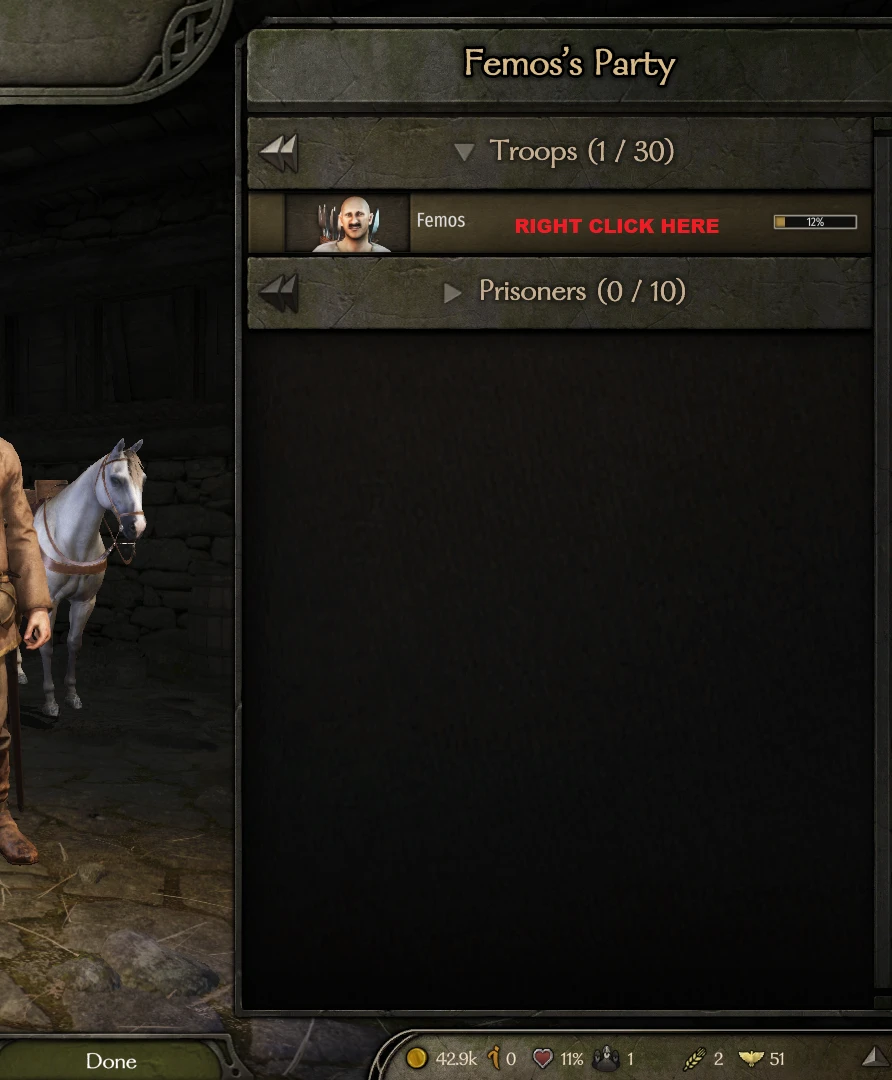
打开派对派对屏幕。
- 右键单击要导出/导入部队列表中的任何角色
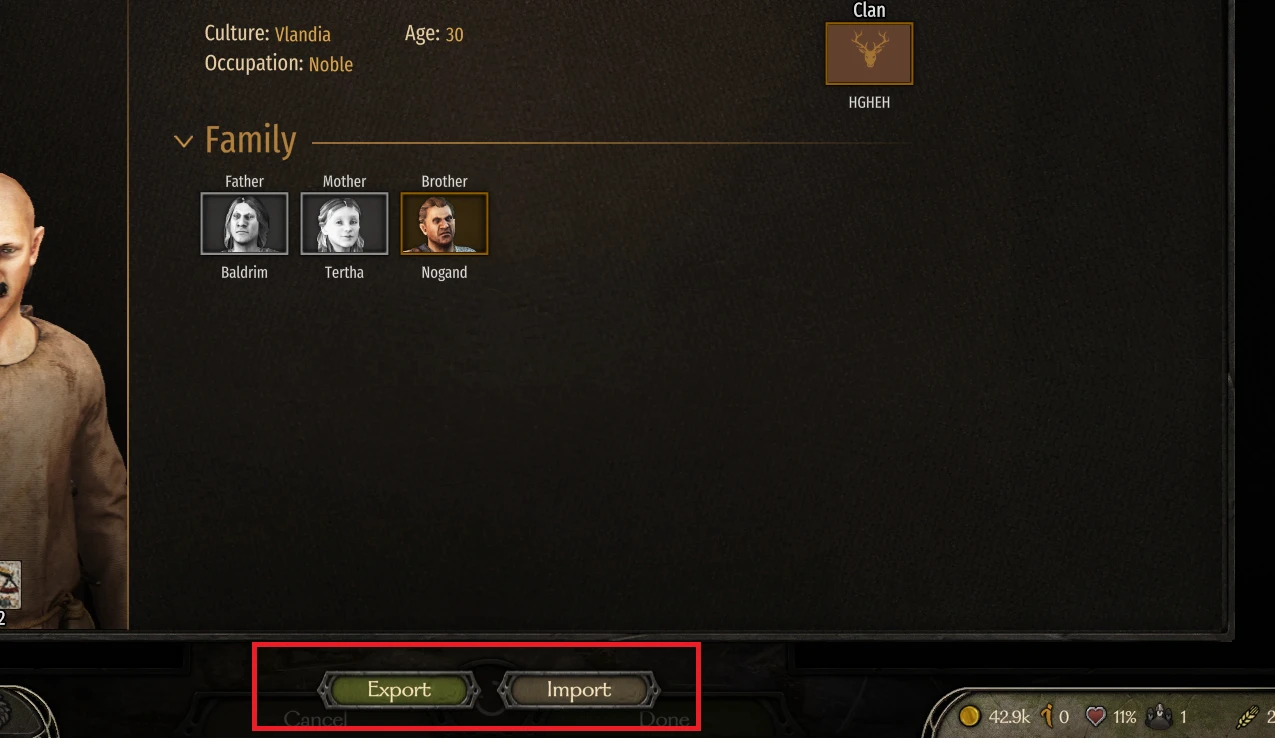
- 百科全书将被打开,你可以看到屏幕底部有2个按钮,
- 出口和and导入
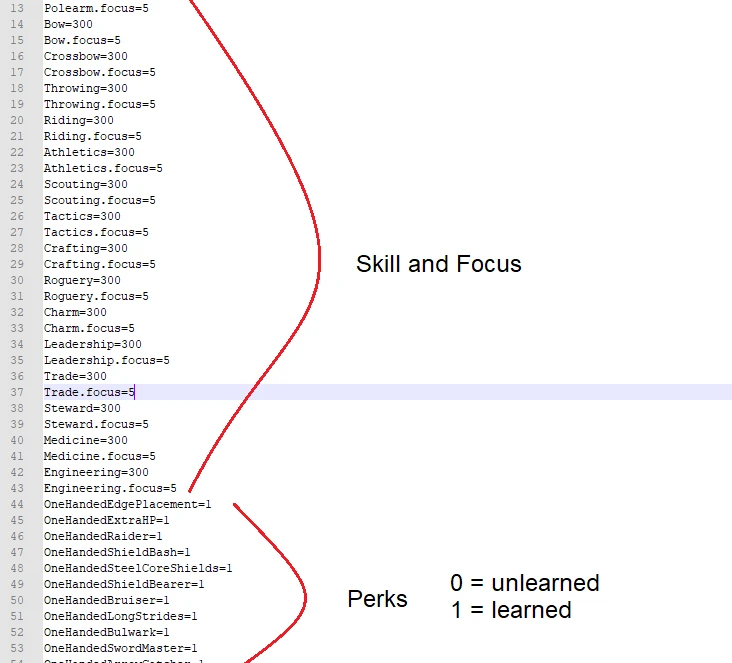
- 如果你选择出口,将在C:\User\(user)\Documents\Mount and Blade II Bannerord\字符训练器\(您的角色名称)\(您的角色名称). txt中创建一个文件
- 根据需要编辑值
- 点击按钮以重新导入您编辑的统计数据。如果您想忽略exp,请在单击按钮时按Shift。伴侣文件将以这种格式命名(您的伴侣名称)。(
- 内部id). txt例如“强壮的吉姆。lord_1_2. txt"从v1.0.8添加以避免冲突,因为我发现许多字符都有相同的名称。您不必担心内部id,只需先导出字符,内部id将在文件名中。您的主要角色也不需要内部id(参见步骤4)
- 删除了经典Ctrl+K和Ctrl+L,如果需要,请使用旧版本。added from v1.0.8 to avoid conflict, because I found many characters have same name. You don't have to worry about internal id, just export the character first, internal id will be in the filename. Also you don't need internal id for your main character (See step 4)
- Classic Ctrl+K and Ctrl+L removed, use older version if you want that.
- 外观变化只适用于你的主角
- Ctrl+L影响字符exp和级别
- Ctrl+班次+L忽略字符exp和关卡
- 如果降低技能水平不起作用,我无能为力,可能是发动机限制不允许你降低技能,我最好的选择是使用Ctrl++L减少Ctrl+L自然增加你的exp版本v1.0.12(仅适用于e1.4.0 beta)
修复e1.4.0 beta上的崩溃,我还没有彻底测试它,
- 使用风险自负直到我有时间自己测试它。版本v1.0.11(仅适用于e1.3.0)
修复e1.3.0 beta上的崩溃
- 版本v1.0.10
Version v1.0.10
- 重组导出的文件。文件被移动到目录C:\User\(user)\Documents\Mount and Blade II Bannerord\字符训练器\(您的角色名称)\
- 阅读如何使用详细更改
版本v1.0.9
- 为那些想要将角色导入到新保存而没有多余属性点和焦点的人添加了“清除未使用积分”按钮
- 从UI访问导出和导入!您现在可以导出/导入您在百科全书中找到的任何英雄。删除了经典的Ctrl+K和Ctrl+L,如果需要,请使用旧版本。
- 对于你不知道的,你可以通过右键单击派对屏幕上的部队列表来访问你的角色百科全书(见上图)
- 修复v1.0.7崩溃
版本v1.0.7
- 坏了
- 从UI访问导出和导入!您现在可以导出/导入您可以在百科全书。删除了经典Ctrl+K和Ctrl+L,如果需要,请使用旧版本。
- For that you don't know, you can access your character Encyclopedia by right clicking yourself on troop list on party screen (See images top)
版本v1.0.6
- 次要bug修复
版本v1.0.5:
- 修复Shift+L(无Control)可以导入字符文件的bug
版本v1.0.4:
- 增加了主角外观支持!您可以通过以下方式将您的伴侣外观转移到您的主角身上身体属性,包括性别和声音。但不幸的是,反之亦然,如果你不知道自己在做什么,请小心。
- 因为有一个关于技能水平是否应该影响角色经验的讨论,我决定两者都支持。看如何使用剖面
- 在SubModules. xml中添加了DependdModules(希望修复发生在某些用户身上的崩溃)
版本v1.0.3:
- 修复启动新活动/加载时的崩溃
版本v1.0.2:
- 为伴侣添加了导出/导入。
- Ctrl+K将导出玩家角色以及派对中的同伴
- Ctrl+L将导入玩家角色以及派对中的同伴
- 添加了BaseHitPoint来修改玩家和同伴的基础健康(Bannerord的默认设置为100)
- 现在更新技能等级不影响经验和等级(过时)
版本v1.0.1:
- 添加了导出/导入字符以修改文本文件中的属性、技能和特权的功能
- Ctrl+K导出,Ctrl+L导入,
- 字符文件位于C:\User\(user)\Documents\Mount and Blade II Bannerord\ChartTrainer
- 您可以像在warband导出字符中一样编辑值,然后使用Ctrl+L重新导入
- 只支持主角,如果我有更多空闲时间,很快就会支持同伴:)
版本v1.0.0:
在地图场景中,按Ctrl+L立即最大化属性、焦点和技能点。
我还没有测试过这个mod的长时间播放,所以要谨慎使用。
本工具由三方[bufftool]提供

立即下载模组
下载客户端搜索骑马与砍杀2:霸主后使用Mod大师工具。