


快速对话
作者:Dallen1393最后更新:2020-05-09 01:15:5161.4万294KB


Mod简介
从与基本上所有地图交互的交互中删除加载屏幕。包括领主、土匪、村民、商队和小派别会议。
特别感谢@Aragas as在Harmony支持下重写了大部分mod。
与掠夺者、强盗和敌方领主互动现在使用菜单而不是对话互动。这至少删除了两个不必要的加载屏幕。
来源:https://github.com/DonoA/MBFastDialogue
随时提交任何PR!
最近的修复:
-强盗巢穴老板打架(1.2)
-与其他模组的兼容性(1.2)
-适用于领主(1.3)
-适用于所有地图交互(1.5)
要配置哪些方将受到该mod的影响,请编辑mod文件夹中的设置. xml文件:
默认情况下,它看起来像:
要使只有抢劫者和土匪受到影响,请像这样更改它:
手动安装:
-将zip文件解压缩到C:\Program Files(x86)\Steam\steamapps\Common\Mount&Blade II Bannerord\Modules。
-确保SubModle. xml和bin文件夹现在位于C:\Program Files(x86)\Steam\steamapps\Common\Mount&Blade II Bannerord\Modules\MBFastTalk中
-在游戏文件中导航到模块>MBFastTalk>bin>Win64_Shipping_Client。
-右键单击“MBFastDialogue. dll”并单击属性
-如果您在底部看到解除屏蔽,请单击它。(视觉参考:https://www.limilabs.com/blog/unblock-dll-file)
-启动横幅领主启动器,然后在Singleplayer>Mods选项卡中勾选MBFastTalk。
- Start the Bannerlord launcher and then tick MBFastDialogue in the Singleplayer > Mods tab.
例如,当与村民互动时,您首先会看到此菜单。如果您想进行更复杂的交互,匡威允许您使用普通对话选项。
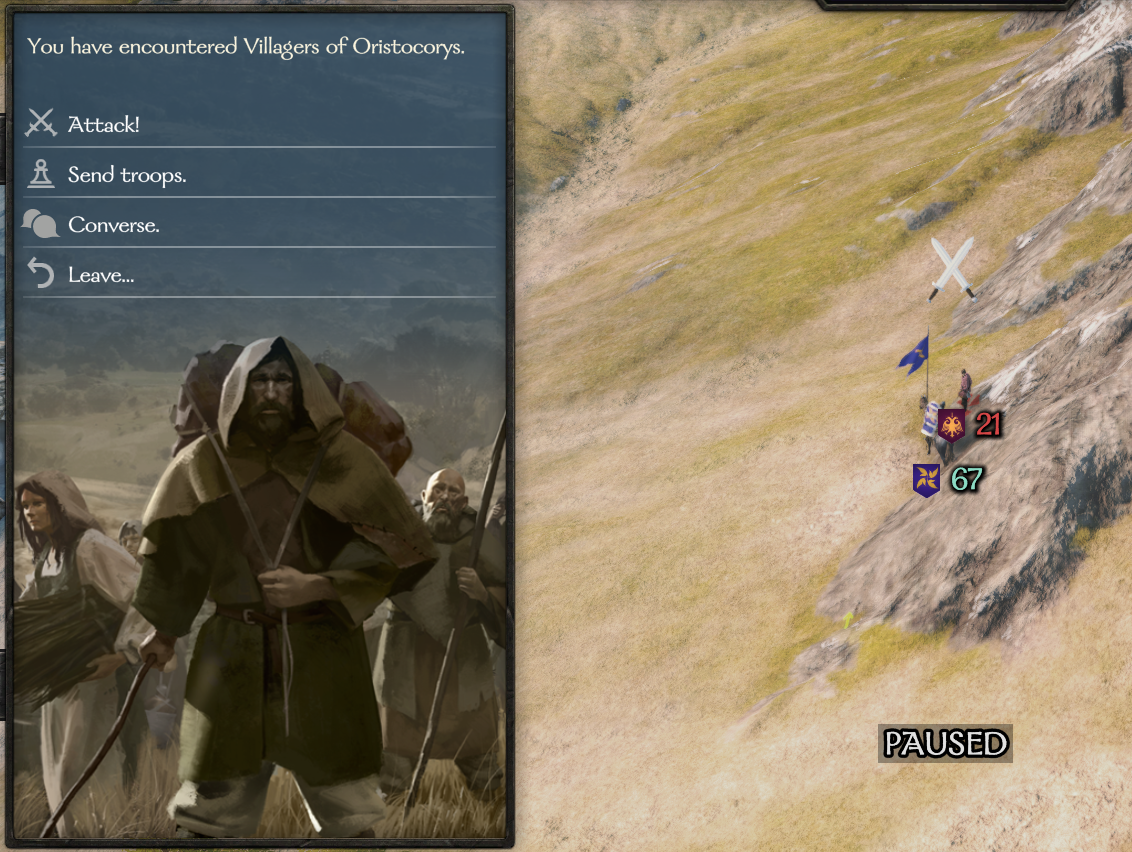
与掠夺者、强盗和敌方领主互动现在使用菜单而不是对话互动。这至少删除了两个不必要的加载屏幕。
来源:https://github.com/DonoA/MBFastDialogue
随时提交任何PR!
最近的修复:
-强盗巢穴老板打架(1.2)
-与其他模组的兼容性(1.2)
-适用于领主(1.3)
-适用于所有地图交互(1.5)
要配置哪些方将受到该mod的影响,请编辑mod文件夹中的设置. xml文件:
默认情况下,它看起来像:
<MBFastDialogue.Settings>
<pattern_whitelist>
<!--pattern>looter</pattern-->
<!--pattern>bandit</pattern-->
</pattern_whitelist>
</MBFastDialogue.Settings>
要使只有抢劫者和土匪受到影响,请像这样更改它:
<MBFastDialogue.Settings>
<pattern_whitelist>
掠夺者
<模式>乐队它</模式>
</pattern_whitelist>
您可以根据需要添加或更改模式。要使所有各方再次受到影响,只需将列表留空或注释掉其中的条目,就像默认设置. xml中一样
手动安装:
-将zip文件解压缩到C:\Program Files(x86)\Steam\steamapps\Common\Mount&Blade II Bannerord\Modules。
-确保SubModle. xml和bin文件夹现在位于C:\Program Files(x86)\Steam\steamapps\Common\Mount&Blade II Bannerord\Modules\MBFastTalk中
-在游戏文件中导航到模块>MBFastTalk>bin>Win64_Shipping_Client。
-右键单击“MBFastDialogue. dll”并单击属性
-如果您在底部看到解除屏蔽,请单击它。(视觉参考:https://www.limilabs.com/blog/unblock-dll-file)
-启动横幅领主启动器,然后在Singleplayer>Mods选项卡中勾选MBFastTalk。
- Start the Bannerlord launcher and then tick MBFastDialogue in the Singleplayer > Mods tab.
例如,当与村民互动时,您首先会看到此菜单。如果您想进行更复杂的交互,匡威允许您使用普通对话选项。
本工具由三方[bufftool]提供

立即下载模组
下载客户端搜索骑马与砍杀2:霸主后使用Mod大师工具。